


































Setting up Special Functions in Go2Clock
Once the terminals have been added to your Go2Clock account, you can enable additional functions such as Auto Delete and Auto Template to automate how employee data is managed across your devices.
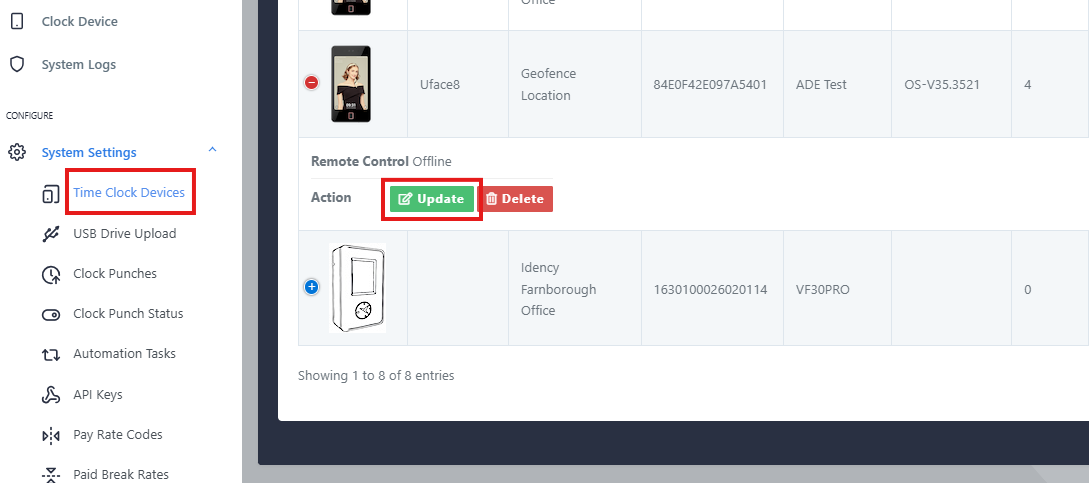
Select Update against the relevant terminal. If the Update option is not visible, select the blue plus icon to display it. Navigate to Special Functions.
Step 2: Enable Auto Delete and Auto Template
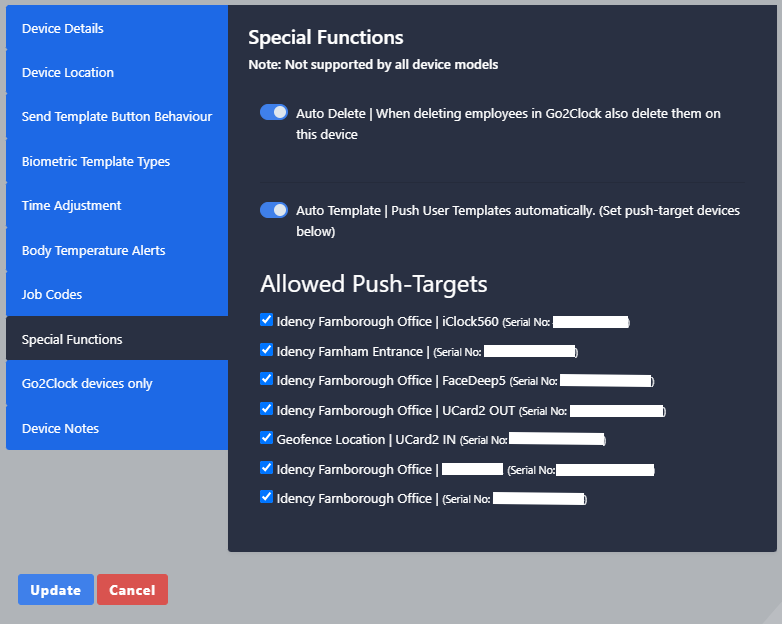
You will see two options available:
- Auto Delete : when enabled, any employee deleted from Go2Clock will also be removed from the terminal automatically, provided the device is online at the time of deletion
- Auto Template: when enabled, employees added to the terminal will automatically be pushed to the terminals selected under Allowed Push Targets
Enable the functions you require. If enabling Auto Template, select the relevant terminals under Allowed Push Targets. Once configured select Update to save.
Not sure how to setup Special Functions?
Our team is on hand to help. Get in touch and we’ll talk you through it.

Go2Clock Cloud Hosted Time & Attendance System

















 English (UK)
  English
  English (Canada)
  Français du Canada
  Svenska
  Português
  Nederlands
  Italiano
  Français
  Español
  Deutsch