


































Go2Clock: Hiding Employees from Reports
Employees can be hidden from reporting in Go2Clock when their clocked times aren’t expected to be reported on. This is useful when an employee needs to stay in Go2Clock and keep clocking for the evacuation report, but should be left out of most other reports.
When an employee is hidden, they won’t appear in many of the Go2Clock reports. They remain in the system and can still be accessed through the Employees section.
How to Hide an Employee from Reports
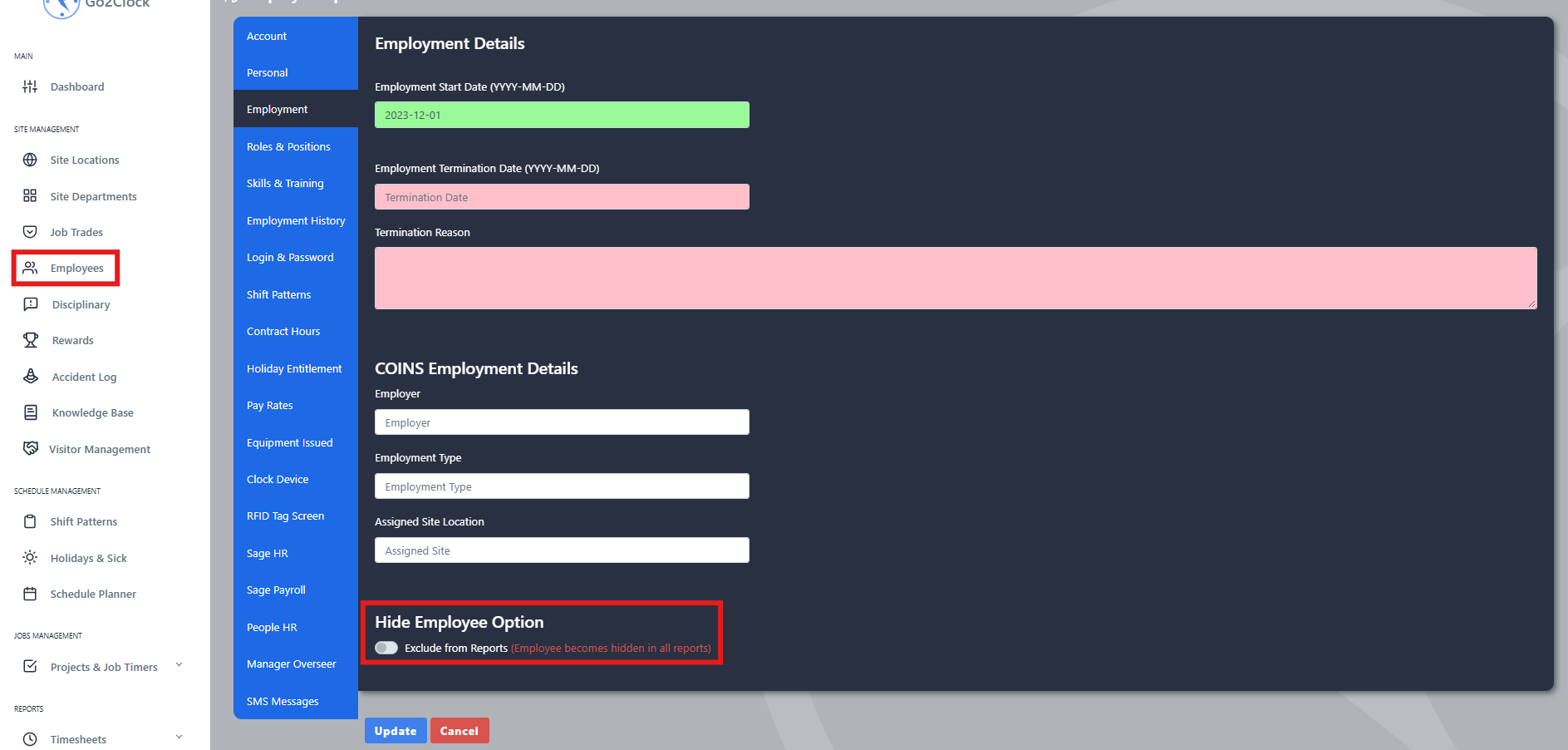
- Navigate to the Employees tab
- Select View
- Find the relevant employee and select Edit
- Navigate to the Employment tab
- Enable the Exclude from Reports switch
- Select Update
Showing the Employee in Reports Again
Once enabled, the employee is hidden from the reports that support this setting. To show them in reporting again, return to the same setting and disable Exclude from Reports.
Need a hand with Go2Clock reports?
If you have any questions about hiding employees from reports, our support team is happy to help.

Go2Clock Cloud Hosted Time & Attendance System

















 English (UK)
  English
  English (Canada)
  Français du Canada
  Svenska
  Português
  Nederlands
  Italiano
  Français
  Español
  Deutsch