


































Go2Clock: Disabling Mobile GPS Location Tracking
By default, when employees clock using their mobile phone, Go2Clock records their GPS location. If GPS location tracking isn’t required or isn’t allowed, you can disable it.
This can be particularly useful where local or regional laws prohibit, or place strict restrictions on, the collection of employee GPS location data.
How to Disable Mobile GPS Location Tracking
To turn off GPS location tracking for mobile clocking:
- Navigate to System Settings
- Select System Config Settings in the dropdown
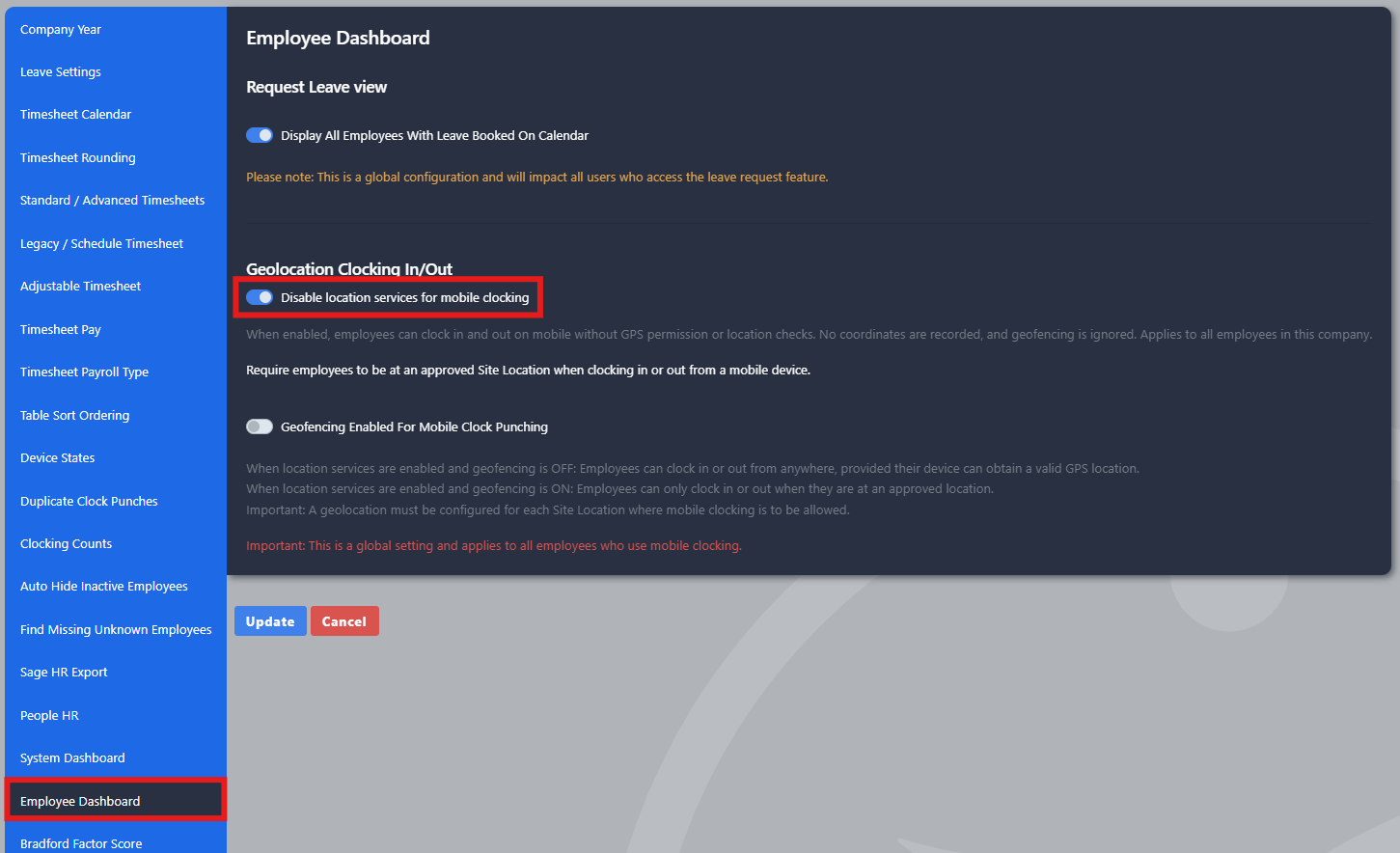
- Navigate to the Employee Dashboard tab
- Enable the Disable location services for mobile clocking switch
- Select Update
What Happens Once It’s Disabled
Employees can still clock in and out using their mobile. Their GPS location simply isn’t required or recorded against the clock record.
Need a hand with mobile clocking settings in Go2Clock?
If you have any questions about disabling GPS location tracking in Go2Clock, our support team is happy to help.

Go2Clock Cloud Hosted Time & Attendance System

















 English (UK)
  English
  English (Canada)
  Français du Canada
  Svenska
  Português
  Nederlands
  Italiano
  Français
  Español
  Deutsch