Het serienummer van een apparaat is een belangrijk deel van de informatie om te weten of het nu voor softwarevernieuwing of technische ondersteuning is. In sommige gevallen kan het moeilijk zijn om het serienummer te achterhalen als de doos of het ontvangstbewijs zoek is geraakt en het serienummer nergens is genoteerd. Er zijn twee methoden om het serienummer van een Anviz C2 Pro apparaat, en dit artikel laat je zien hoe.
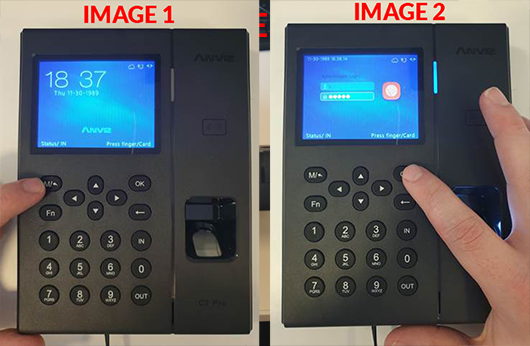
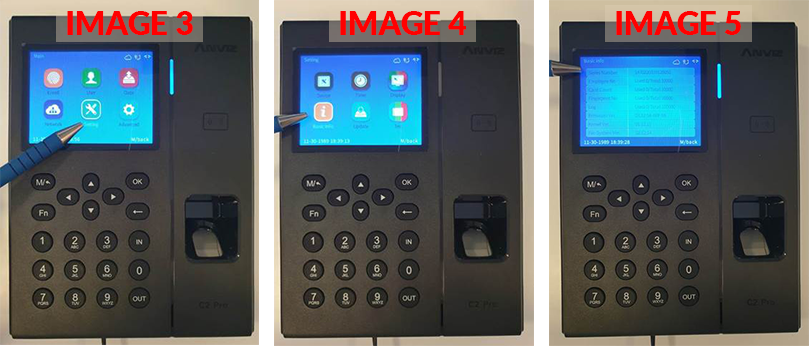
U kunt de Anviz C2 Pro apparaatserienummer via het apparaatmenu in het apparaat ‘Basisinstellingen’.
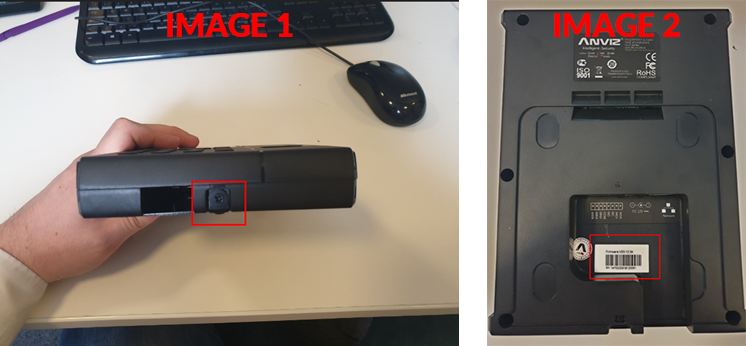
U kunt de Anviz C2 Pro Het serienummer van het apparaat door de achterplaat los te schroeven en de sticker op het apparaat te bekijken.
 Voor meer informatie en algemeen advies over onze producten en diensten kunt u terecht op contact met ons opnemen.
Heb je meer ondersteuning nodig?
Alles zoeken Kennisbank artikelen
Stuur een Ondersteuningsverzoek naar het Idency-ondersteuningsteam














 English (UK) English (UK)
  English
 English (Canada)
 Français du Canada
 Nederlands
 Svenska





















