


































Go2Clock : Activer et gérer la 2FA
La cybersécurité devient de plus en plus importante à mesure que les menaces évoluent. L’authentification à deux facteurs (2FA) offre une couche supplémentaire de sécurité en empêchant l’accès non autorisé aux données importantes et sensibles stockées sur votre compte Go2Clock en exigeant aux utilisateurs de vérifier leur identité à l’aide d’un code envoyé à leur adresse e-mail lors de leur connexion.
Go2Clock prend actuellement en charge le 2FA grâce à la vérification par courrier électronique.
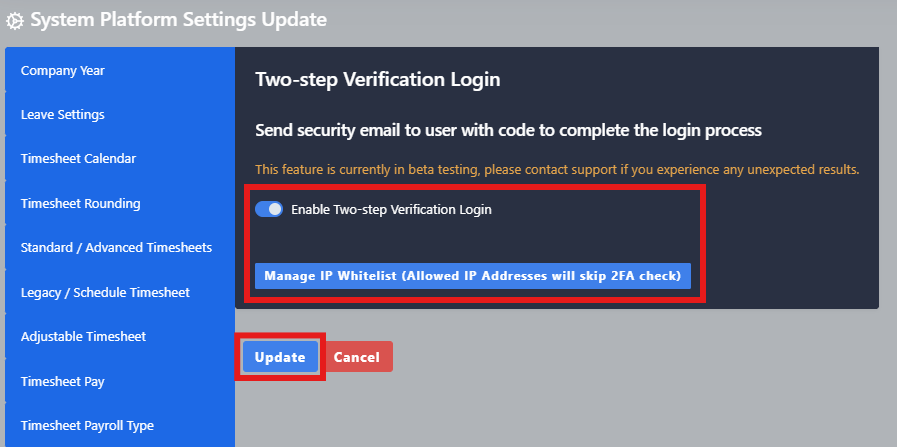
Étape 1 : Activer l'authentification à deux facteurs
- Accédez aux paramètres système
- Sélectionner Paramètres de configuration du système
- Sélectionnez l'option 2FA – Vérification en deux étapes onglet
- Activez le commutateur 2FA
- Sélectionner Mise à jour Pour enregistrer les modifications
Une fois activé, chaque fois qu'un utilisateur connectera à Go2Clock, il recevra un code de vérification par e-mail. L'utilisateur doit entrer ce code pour terminer le processus de connexion. Les codes 2FA restent actifs pendant 10 minutes avant de devenir obsolètes.
Étape 2 : Ajouter l’adresse IP blanche
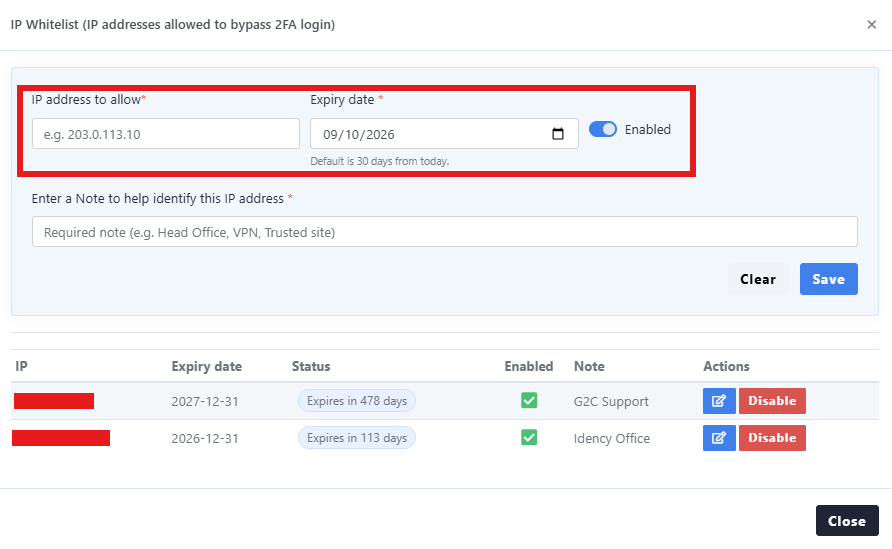
Vous pouvez configurer l’authentification IP Whitelisting à partir de la même rubrique 2FA – Two Step Verification. Cela vous permet de spécifier des adresses IP publiques de confiance à partir desquelles les utilisateurs peuvent accéder à Go2Clock sans avoir besoin d’entrer les codes de 2FA.
- Accédez à « Paramètres système » → « Paramètres de configuration système » → « 2FA – Vérification à deux étapes »
- Sélectionner Gérer la liste blanche d’adresses IP
- Entrez l’adresse IP publique qui doit être autorisée à accéder à Go2Clock sans 2FA
- Configurer la date d'expiration
- Entrez une note pour identifier l’emplacement qui a été ajouté à la liste blanche
- Sélectionner Économiser créer la liste blanche
Les adresses IP figurant sur la liste blanche peuvent être désactivées ou leur date d’expiration modifiée depuis la fenêtre « Gestion de la liste blanche IP ».
Une adresse IP publique est différente de l’adresse IP interne attribuée à des ordinateurs ou appareils individuels dans le réseau de votre entreprise. Si vous n’êtes pas sûr de l’adresse IP publique à utiliser, contactez votre administrateur informatique ou réseau.
Avez-vous besoin d'aide pour configurer le mécanisme de deux facteurs de sécurité dans Go2Clock ?
Si vous avez des questions concernant l’activation de la 2FA ou la gestion de votre liste blanche IP, notre équipe d’assistance est à votre disposition.

Go2Clock Système de gestion du temps et des présences hébergé dans le nuage

















 English (UK)
  English
  English (Canada)
  Français du Canada
  Svenska
  Português
  Nederlands
  Italiano
  Français
  Español
  Deutsch