


































Go2Clock: habilitar y administrar la autenticación de dos factores
La ciberseguridad cobra cada vez mayor importancia a medida que las amenazas continúan evolucionando. La autenticación de dos factores (2FA) proporciona una capa adicional de seguridad, evitando el acceso no autorizado a datos importantes y confidenciales almacenados en tu cuenta Go2Clock al requerir que los usuarios verifiquen su identidad utilizando un código enviado a su dirección de correo electrónico al iniciar la sesión.
Go2Clock actualmente admite la autenticación de dos factores mediante verificación por correo electrónico.
Paso 1: Activa la autenticación de dos factores
- Diríjase a Configuración del sistema
- Seleccionar Configuración del sistema
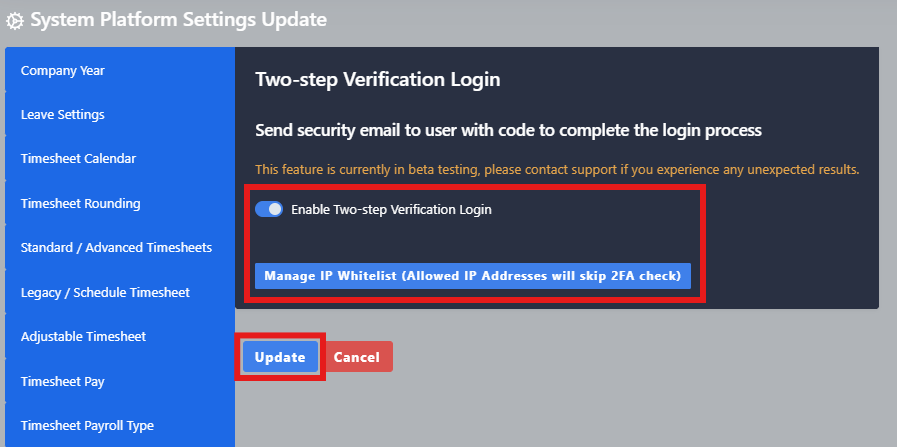
- Seleccione 2FA – Verificación en dos pasos pestaña
- Activa el interruptor de 2FA
- Seleccionar Actualizar Para guardar los cambios
Una vez activado, cada vez que un usuario inicie sesión en Go2Clock recibirá un código de verificación por correo electrónico. El usuario debe introducir este código para completar el proceso de inicio de sesión. Los códigos de 2FA permanecen activos durante 10 minutos antes de expirar.
Paso 2: Agregar la dirección IP blanca
Puede configurar la lista blanca de IP desde la misma pestaña de Verificación en dos pasos – Two Step Verification. Esto le permite especificar direcciones IP públicas de confianza desde las que los usuarios podrán acceder a Go2Clock sin necesidad de introducir códigos de verificación en dos pasos.
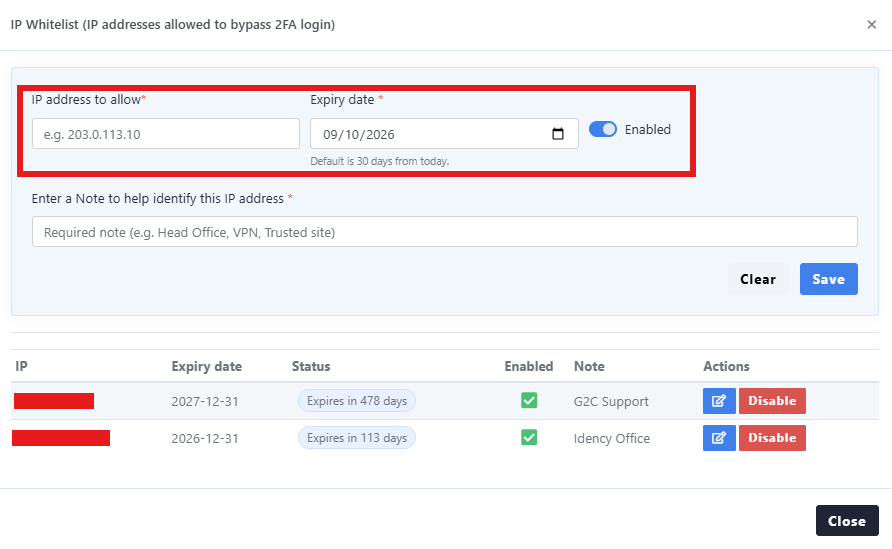
- Diríjase a Configuración del sistema → Configuración de la configuración del sistema → pestaña 2FA – Verificación en dos pasos
- Seleccionar Administrar la lista blanca de IP
- Introduzca la dirección IP pública que debe tener permiso para acceder a Go2Clock sin 2FA
- Defina la fecha de caducidad
- Introduzca una nota para identificar qué ubicación se ha incluido en la lista blanca
- Seleccionar Guardar crear la lista blanca
Las direcciones IP incluidas en la lista blanca pueden ser desactivadas o su fecha de caducidad puede modificarse desde la ventana «Administrar lista blanca de IP».
Una dirección IP pública es diferente de la dirección IP interna asignada a los equipos o dispositivos individuales de la red de tu empresa. Si no estás seguro de la dirección IP pública que debes utilizar, ponte en contacto con el administrador de TI o de la red.
¿Necesita ayuda para configurar la autenticación de dos factores en Go2Clock?
Si tiene alguna pregunta sobre cómo habilitar la autenticación de dos factores o cómo administrar su lista blanca de IPs, nuestro equipo de soporte estará encantado de ayudarle.

Sistema de control de presencia y fichaje en la nube Go2Clock

















 English (UK)
  English
  English (Canada)
  Français du Canada
  Svenska
  Português
  Nederlands
  Italiano
  Français
  Español
  Deutsch