



































Anviz C2 Pro: Come trovo il numero di serie del dispositivo?
Come trovare il numero di serie del dispositivo Anviz C2 Pro
Il numero di serie di un dispositivo è una parte importante delle informazioni per capire se si tratta di un rinnovo del software o di assistenza tecnica. In alcuni casi può essere difficile scoprirlo, poiché la scatola o la ricevuta sono andate perse e il numero di serie non è stato annotato da nessun altro luogo. Esistono due metodi per trovare il numero di serie di un dispositivo: Anviz C2 Pro il dispositivo, e questo articolo vi mostrerà come farlo.
Metodo 1: accesso tramite il menu del dispositivo
È possibile individuare il Anviz C2 Pro il numero di serie del dispositivo tramite il menu del dispositivo all’interno delle ‘Impostazioni di base’ del dispositivo.
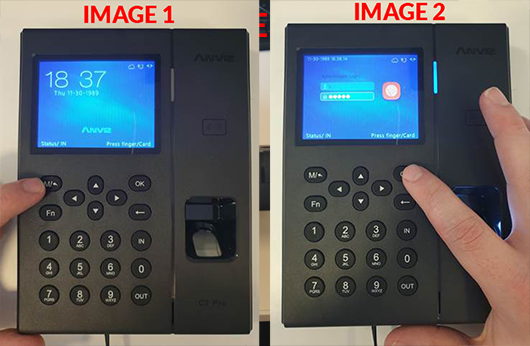
- Premi il M/ Questo vi chiederà l'ID di accesso e la password dell'amministratore.
- Inserite il vostro ID amministratore e la password e premete OK sul tastierino numerico. Predefinito ID: 0 / PW: 12345 (vedi le immagini 1 e 2).
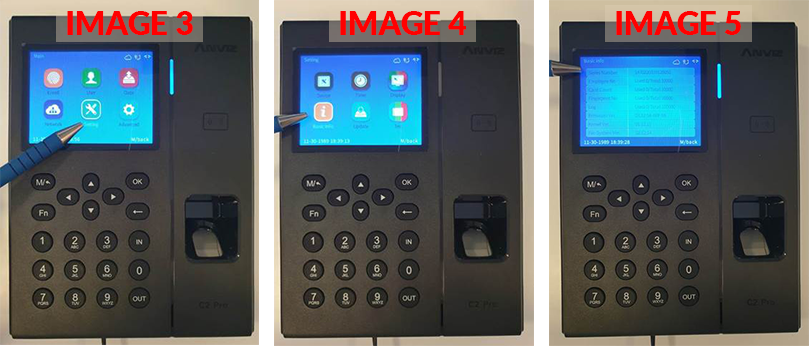
- Utilizzando i tasti freccia sul tastierino numerico, navigate alla Impostazioni poi selezionare OK. Quindi selezionate Informazioni di base (vedi le immagini 3 e 4).
- I tuoi dispositivi numero di serie sarà elencato direttamente in cima (vedi immagine 5).
Metodo 2: accesso svitando la placca posteriore
È possibile individuare il Anviz C2 Pro identificare il numero di serie del dispositivo svitando la placca posteriore e guardando l'etichetta del dispositivo.
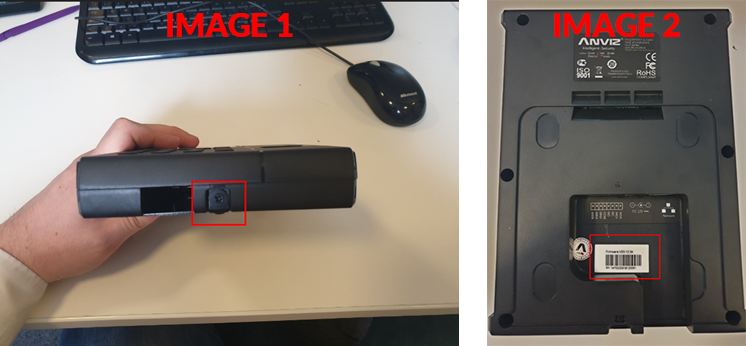
- Per farlo, svitare il dispositivo dalla placca posteriore usando uno spillo a testa Phillips (vedi immagine 1).
- Il numero di serie è riportato su un adesivo sul retro del dispositivo, con l’inizio ‘SN: 1470220117…’ (vedi immagine 2).
 Per ulteriori informazioni e indicazioni generali sui nostri prodotti e servizi, si prega di Contattaci.
Hai bisogno di ulteriore supporto?
Cerca tutto Base di conoscenza articoli
Invia un Richiesta di supporto Al Team di Supporto di Idency

















 English (UK)
  English
  English (Canada)
  Français du Canada
  Svenska
  Português
  Nederlands
  Italiano
  Français
  Español
  Deutsch