



































Anviz C2 Pro: ¿Cómo encuentro el número de serie del dispositivo?
Cómo localizar el número de serie del dispositivo Anviz C2 Pro
El número de serie de un dispositivo es una información importante para saber si se trata de una renovación de software o de asistencia técnica. En algunos casos, puede ser difícil de encontrar, ya que la caja o el recibo se han perdido y el número de serie no se ha anotado en ningún lugar. Existen dos métodos para localizar el número de serie de un dispositivo: Anviz C2 Pro dispositivo, y este artículo te mostrará cómo hacerlo.
Método 1: acceso a través del menú del dispositivo
Puedes localizar el Anviz C2 Pro El número de serie del dispositivo a través del menú del dispositivo dentro de las ‘Configuraciones básicas’ del dispositivo.
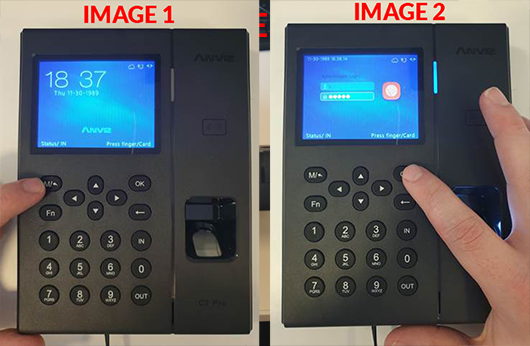
- Pulse el botón M/ Este botón le pedirá el ID de inicio de sesión y la contraseña del administrador.
- Introduzca su ID de administrador y contraseña y presione OK en el teclado. Por defecto ID: 0 / PW: 12345 (ver las imágenes 1 y 2).
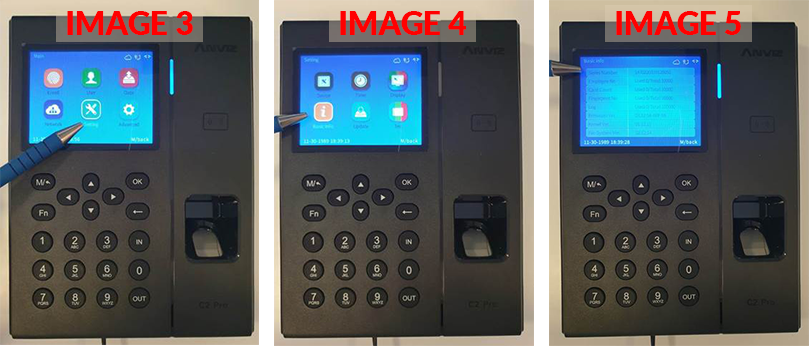
- Utilizando las teclas de flecha del teclado, navegue hasta Configuración Luego seleccione De acuerdo.Luego seleccione Información básica (ver las imágenes 3 y 4).
- Sus dispositivos número de serie Se mostrará justo en la parte superior (ver imagen 5).
Método 2: acceso mediante la extracción de la placa posterior
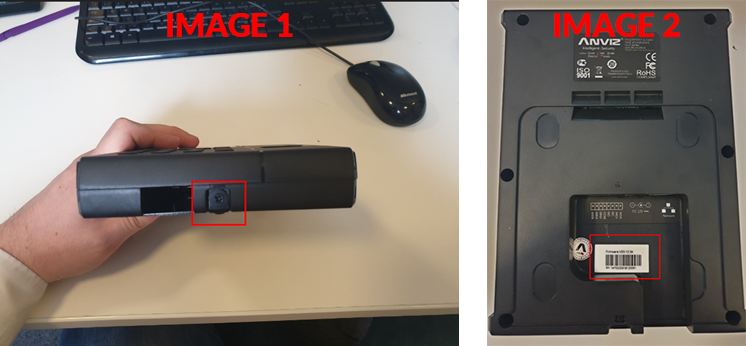
Puedes localizar el Anviz C2 Pro consulte el número de serie del dispositivo desenroscando la placa posterior y mirando la pegatina del dispositivo.
- Para hacerlo, desenrosca el dispositivo de la placa trasera utilizando un destornillador de cabeza Phillips (ver imagen 1).
- El número de serie se encuentra en una pegatina en la parte posterior del dispositivo, comenzando por ‘SN: 1470220117…’ (ver imagen 2).
 Para obtener más información y orientación general sobre nuestros productos y servicios, por favor Contáctenos.
¿Requiere más ayuda?
Buscar todo Base de conocimiento artículos
Enviar un Solicitud de asistencia Al equipo de soporte de Idency

















 English (UK)
  English
  English (Canada)
  Français du Canada
  Svenska
  Português
  Nederlands
  Italiano
  Français
  Español
  Deutsch