



































Anviz C2 Pro: Como descubro o número de série do dispositivo?
Como localizar o número de série de um dispositivo Anviz C2 Pro
O número de série de um dispositivo é uma informação importante de saber, seja para renovações de software ou assistência técnica. Em alguns casos, pode ser difícil encontrá-lo quando a caixa ou o recibo se perderam e o número de série não foi anotado em lado nenhum. Existem dois métodos sobre como localizar o número de série para um Anviz C2 Pro dispositivo, e este artigo vai mostrar-lhe como.
Método 1: aceder através do menu do dispositivo
Pode localizar o Anviz C2 Pro número de série do dispositivo através do menu do dispositivo nas ‘Definições Básicas’ do dispositivo.
- Prima o M/ botão. Isto pedir-lhe-á o ID de início de sessão e a palavra-passe de Administrador.
- Introduza o ID de Administrador e a Palavra-passe e prima OK no teclado numérico. Predefinição ID: 0 / PW: 12345 (ver imagem 1 e 2).
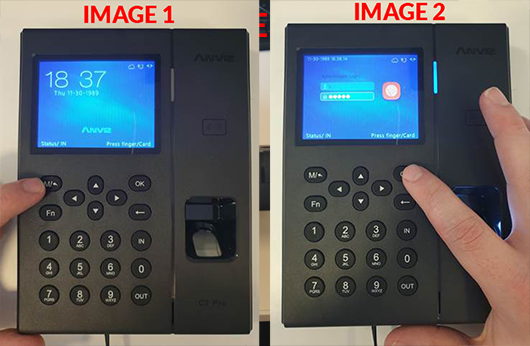
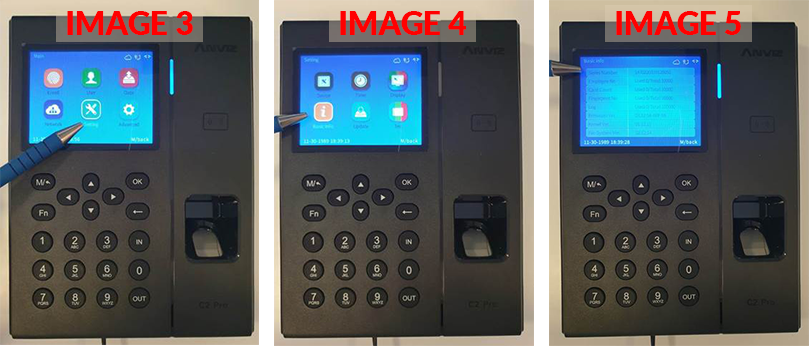
- Utilizando as setas no teclado numérico, navegue até Definição depois selecione OK.Em seguida, selecione Informação Básica (ver imagem 3 e 4).
- Os seus dispositivos número de série será listado logo no topo (ver imagem 5).
Método 2: acesso desaparafusando a placa traseira
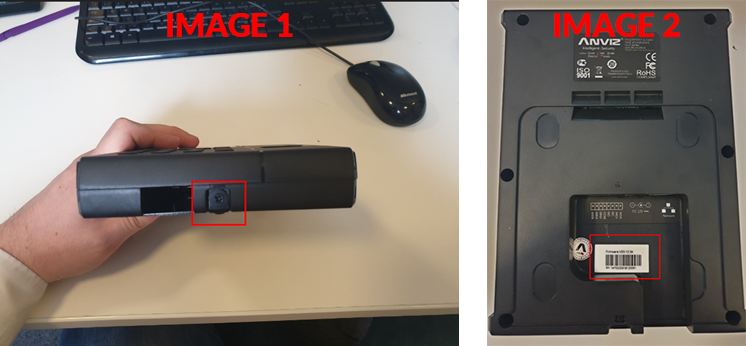
Pode localizar o Anviz C2 Pro número de série do dispositivo desaparafusando a placa traseira e olhando para o autocolante do dispositivo.
- Para fazer isto, desaperte o dispositivo da placa traseira utilizando uma chave de fendas Phillips (ver imagem 1).
- O número de série consta numa etiqueta na parte de trás do dispositivo, a começar por ‘SN: 1470220117…’ (ver imagem 2).
 Para mais informações e orientações gerais sobre os nossos produtos e serviços, por favor Contacte-nos.
Necessita de mais apoio?
Pesquisar tudo Base de conhecimento artigos
Enviar um Pedido de suporte Para a Equipa de Apoio da Idency

















 English (UK)
  English
  English (Canada)
  Français du Canada
  Svenska
  Português
  Nederlands
  Italiano
  Français
  Español
  Deutsch