


































Go2Clock: So importieren Sie PeopleHR-Mitarbeiter
Bevor Sie den PeopleHR-Mitarbeiterimport verwenden, stellen Sie sicher, dass die PeopleHR-API-Verbindung in Go2Clock eingerichtet wurde. Wenn die API-Verbindung noch nicht konfiguriert wurde, lesen Sie bitte diesen Knowledge-Base-Artikel: Wie man PeopleHR mit Go2Clock verbindet
Schritt 1: Erstellen Sie eine neue Abteilung
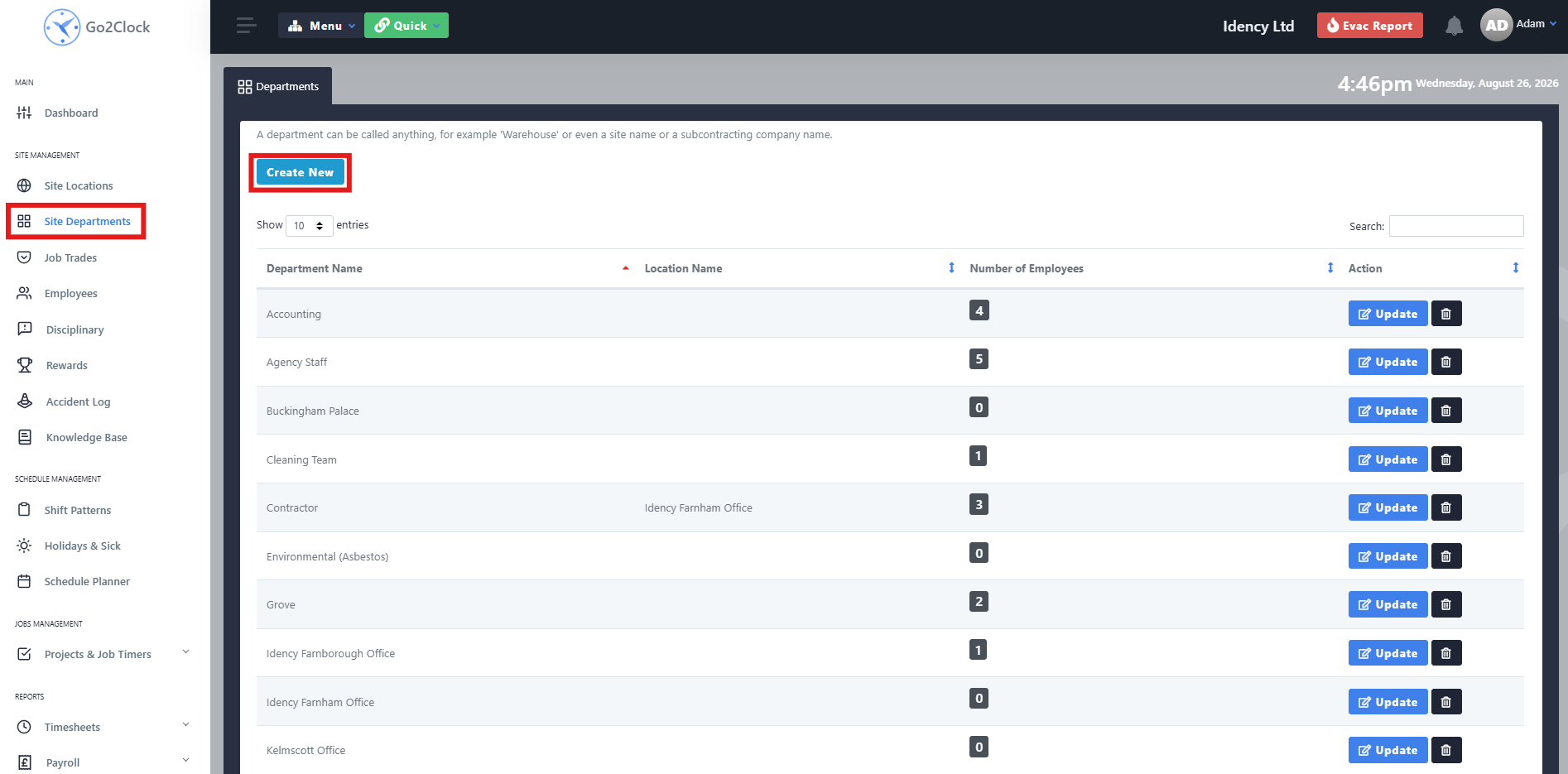
Bevor Sie Mitarbeiter direkt von PeopleHR in Go2Clock importieren, müssen Sie zunächst sicherstellen, dass alle Ihre PeopleHR-Abteilungen in Go2Clock erstellt wurden. Dadurch wird sichergestellt, dass Mitarbeiter beim Import automatisch der richtigen Abteilung zugewiesen werden.
- Zu den Abteilungen navigieren
- Auswählen Neu erstellen
Schritt 2: Abteilung benennen und erstellen
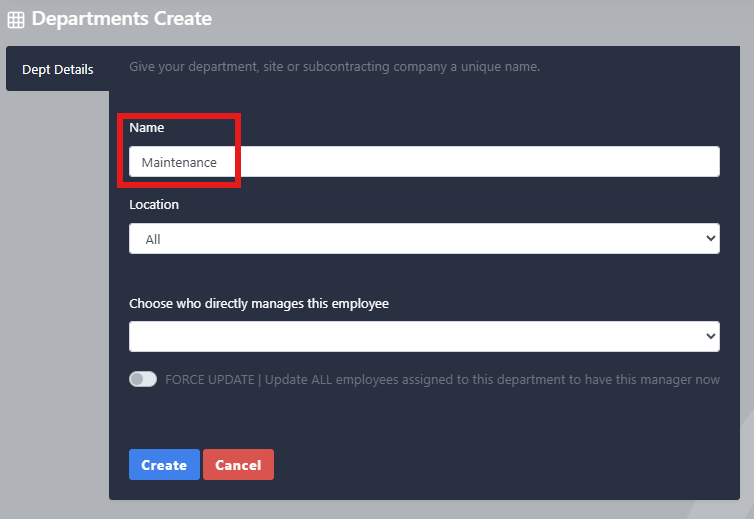
- Geben Sie den Namen der Abteilung ein
- Auswählen Erstellen
Wiederholen Sie diesen Vorgang, bis alle Ihre PeopleHR-Abteilungen in Go2Clock erstellt wurden
Schritt 3: PeopleHR-Mitarbeiter importieren
Sobald die PeopleHR-API-Verbindung hergestellt und die erforderlichen Abteilungen erstellt wurden, können Sie Ihre Mitarbeiter aus PeopleHR importieren.
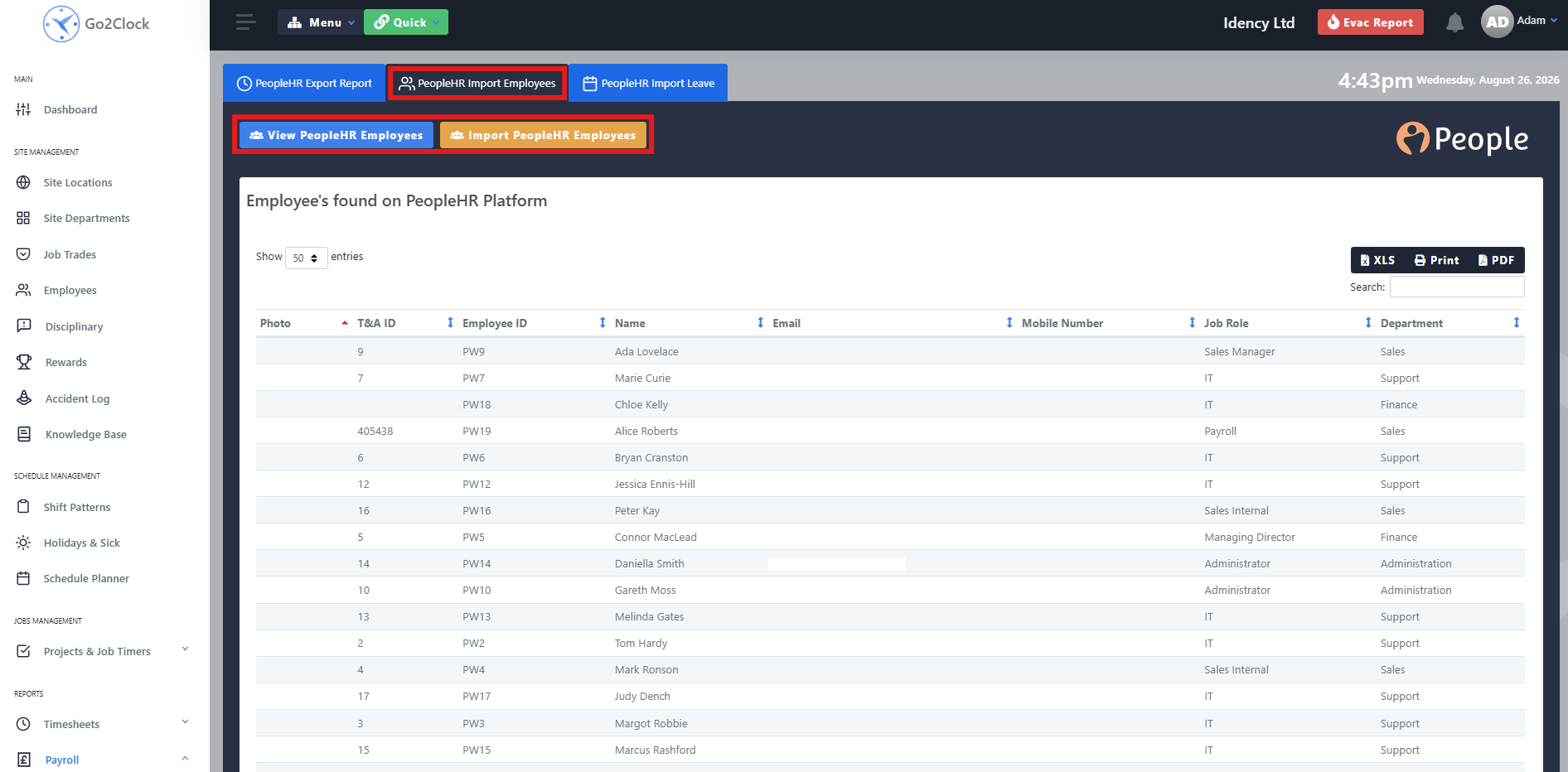
- Gehen Sie zur Lohnabrechnung
- Auswählen PeopleHR Import & Import
- Wählen Sie oben auf dem Bildschirm PeopleHR Mitarbeiterimport
Von diesem Tab aus können Sie die PeopleHR-Mitarbeiter einsehen, die vor dem Import nach Go2Clock übernommen werden, wobei alle Informationen angezeigt werden, die übertragen werden. Sobald Sie bereit sind, wählen Sie Mitarbeiter importieren. Go2Clock ruft dann die Mitarbeiterinformationen von PeopleHR ab und legt die Mitarbeiter an.
Mitarbeiter werden automatisch mit ihrer entsprechenden PeopleHR-Mitarbeiter-ID verknüpft, sodass Go2Clock sie bei der Verwendung anderer PeopleHR-Integrationsfunktionen wie dem Importieren von Abwesenheiten und dem Exportieren von Zeiterfassungsdaten identifizieren kann. Sie können den Import jederzeit erneut ausführen, wenn ein neuer Mitarbeiter zu PeopleHR hinzugefügt wurde – es werden nur Mitarbeiter hinzugefügt, die noch nicht in Go2Clock vorhanden sind.
Brauchen Sie Hilfe beim Importieren Ihrer PeopleHR-Mitarbeiter?
Wenn Sie Probleme beim Verbinden von PeopleHR oder beim Importieren von Mitarbeitern haben, hilft Ihnen unser Support-Team gerne weiter.

Go2Clock Cloud-basiertes Zeiterfassungssystem

















 English (UK)
  English
  English (Canada)
  Français du Canada
  Svenska
  Português
  Nederlands
  Italiano
  Français
  Español
  Deutsch