



































Soluzione ZKTeco S922 Amministratore Bloccato: Ripristino Impostazioni di Fabbrica
Come reimpostare il dispositivo ZKTeco S922 in modalità di fabbrica
Questo articolo contiene le istruzioni dettagliate su come reimpostare il dispositivo al valore di fabbrica. ZKTeco S922 Terminal per il controllo orario e la presenza. Questo processo di reset del dispositivo è particolarmente utile per risolvere il problema del blocco dell’amministratore.
- Per reimpostare il dispositivo in fabbrica, prima collegatelo al vostro rete e collegare il dispositivo alla vostra scelta software.
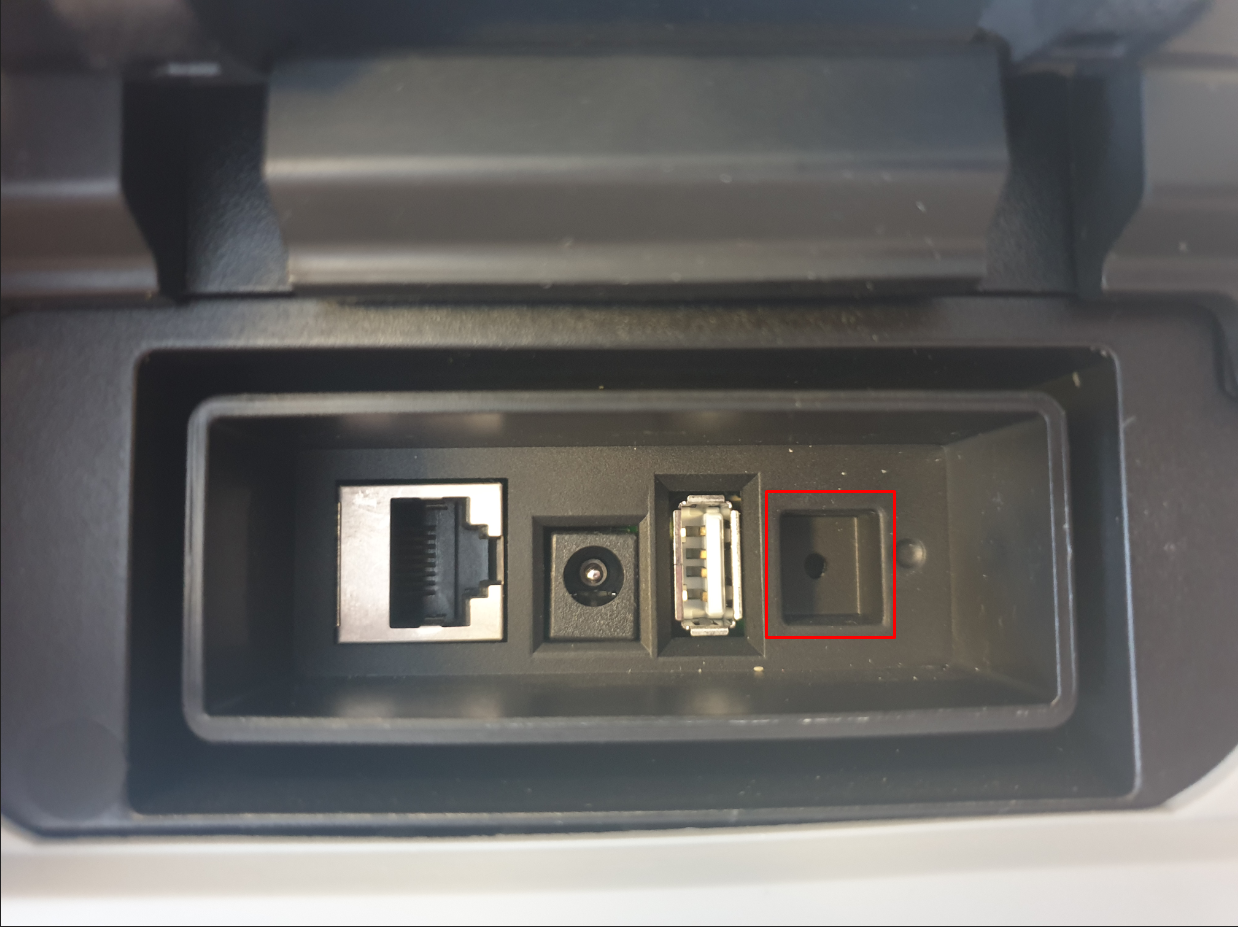
Se non riesci a visualizzare il dispositivo durante la ricerca per aggiungere il S922, ripristina il dispositivo usando un fermaglio per carta per premere il pulsante di ripristino sul retro del dispositivo (vedi immagine) mentre il Ethernet È collegato. Ciò riassegnerà un indirizzo IP all'interno della rete. Ora potrai aggiungere il S922 al software scelto senza problemi.
- Dopo i passaggi sopra riportati, selezionare Elimina tutti i dati bottoncino sotto Gestione dei dispositivi e dei dati.
- Per risolvere il problema dell'amministratore bloccato, puoi rimuovere il privilegio amministrativo dall' stesso finestrino.
- Ora riavvio il dispositivo verrà ripristinato alle impostazioni di fabbrica.
Hai bisogno di supporto?
Se vi trovate in difficoltà e desiderate la nostra assistenza, potete acquistare 2 ore di supporto remoto qui: Configurazione e supporto del sistema di rilevazione orario e presenza. In questo modo potremo accedere al tuo computer da remoto e aiutarti a collegare il dispositivo per poi ripristinarlo. Se non risiedi in una delle regioni in cui è possibile effettuare l’ordine online, ti preghiamo di contattarci. Contattaci e vi invieremo una fattura direttamente.
Per ulteriori informazioni e indicazioni generali sui nostri prodotti e servizi, si prega di Contattaci.
Hai bisogno di ulteriore supporto?
Cerca tutto Base di conoscenza articoli
Invia un Richiesta di supporto Al Team di Supporto di Idency

















 English (UK)
  English
  English (Canada)
  Français du Canada
  Svenska
  Português
  Nederlands
  Italiano
  Français
  Español
  Deutsch