



































Anviz M5 Plus: Disabilitare la funzione del modulo BLE e WiFi
La funzione del modulo BLE e WiFi dell'Anviz M5 Plus può essere disabilitata e come?
Sì, il Anviz M5 Plus La funzione del modulo BLE e WiFi può essere disattivata. Per fare ciò, si prega di seguire i seguenti passaggi:
Disattivazione della funzione del modulo BLE&WiFi dell'Anviz M5 Plus:
Accedi al server web Anviz per l'M5 Plus inserendo l'indirizzo IP del terminale in un browser web.
- Passa alla scheda ‘Rete‘
- Da qui naviga fino al ‘Senza fili‘ tab
- Entro il‘Senza fili‘ impostazioni, seleziona ‘inattivo‘ opzione sotto la ‘Opzioni‘menu a discesa
- Clicca Invia
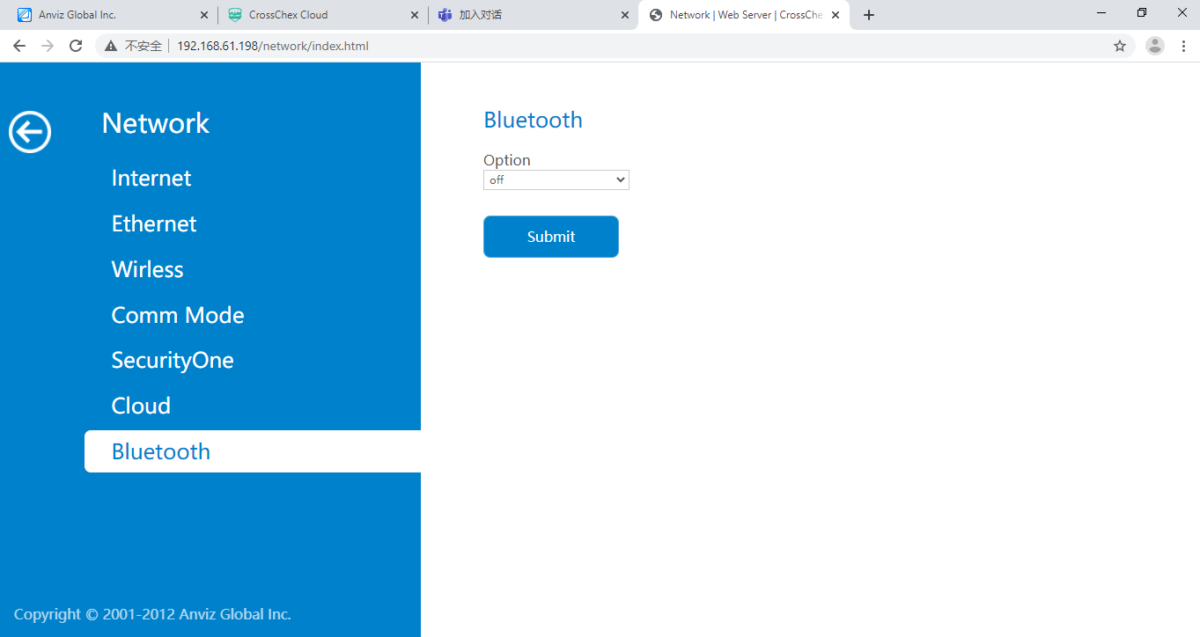
- Ancora all'interno del‘Rete‘impostazioni, vai su‘Bluetooth‘ tab
- Seleziona il‘spento‘ opzione sotto la ‘Opzioni‘menu a discesa
- Clicca Invia
Nota: Potrebbe anche essere necessario riavviare il dispositivo se non si riscontrano modifiche
Per ulteriori informazioni e indicazioni generali sui nostri prodotti e servizi, si prega di Contattaci.
Hai bisogno di ulteriore supporto?
Cerca tutto Base di conoscenza articoli
Invia un Richiesta di supporto Al Team di Supporto di Idency

















 English (UK)
  English
  English (Canada)
  Français du Canada
  Svenska
  Português
  Nederlands
  Italiano
  Français
  Español
  Deutsch