



































Anviz M5 Plus: BLE- und WLAN-Modul-Funktion deaktivieren
Kann die BLE- und WLAN-Modul-Funktion des Anviz M5 Plus deaktiviert werden und wie?
Ja, der Anviz M5 Plus Die BLE- und WLAN-Modul-Funktion kann deaktiviert werden. Führen Sie dazu die folgenden Schritte aus:
Deaktivieren der Funktion des Anviz M5 Plus BLE- und WLAN-Moduls:
Melden Sie sich beim Anviz-Webserver für den M5 Plus an, indem Sie die IP-Adresse des Terminals in einen Webbrowser eingeben.
- Navigieren Sie zum Tab ‘Netzwerk‘
- Navigieren Sie von hier aus zum ‘Drahtlos‘ Tab
- Im‘Drahtlos‘Einstellungen, wählen Sie die‘inaktiv‘Option unter der‘Optionen‘Dropdown
- Klicken Einreichen
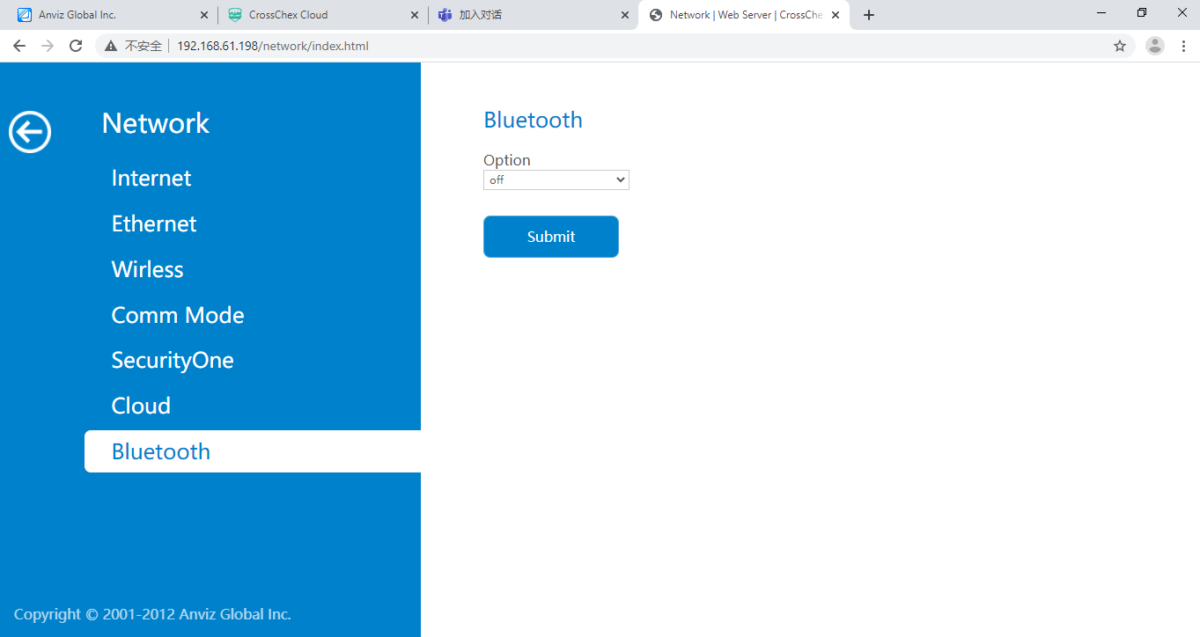
- Immer noch innerhalb der ‘Netzwerk‘Einstellungen, navigieren Sie zu den‘Bluetooth‘ Tab
- Wählen Sie die‘aus‘Option unter der‘Optionen‘Dropdown
- Klicken Einreichen
Hinweis: Möglicherweise müssen Sie das Gerät auch neu starten, wenn Sie keine Änderungen feststellen
Für weitere Informationen und allgemeine Hinweise zu unseren Produkten & Dienstleistungen, bitte Kontaktieren Sie uns.
Benötigen Sie weitere Unterstützung?
Alle durchsuchen Wissensdatenbank Artikel
Sende eine Support-Anfrage An das Idency-Support-Team

















 English (UK)
  English
  English (Canada)
  Français du Canada
  Svenska
  Português
  Nederlands
  Italiano
  Français
  Español
  Deutsch