



































Anviz M5 Plus: Desactivar la función del módulo BLE y Wi-Fi
¿Es posible desactivar la función del módulo BLE&WiFi de Anviz M5 Plus y cómo hacerlo?
Sí, el Anviz M5 Plus La función del módulo BLE&WiFi puede desactivarse. Para hacerlo, siga los siguientes pasos:
Deshabilitar la función del módulo BLE&WiFi de Anviz M5 Plus:
Ingrese a la web del servidor de Anviz para el M5 Plus ingresando la dirección IP del terminal en un navegador web.
- Diríjase a la pestaña ‘Red‘
- Desde aquí, navegue hasta la sección ‘Sin cable‘ pestaña
- Dentro de la ‘Sin cable‘En la sección ‘Configuración', seleccione 'inactivo‘opción‘ en el apartado ‘Opciones‘ dropdown’
- Hacer clic Enviar
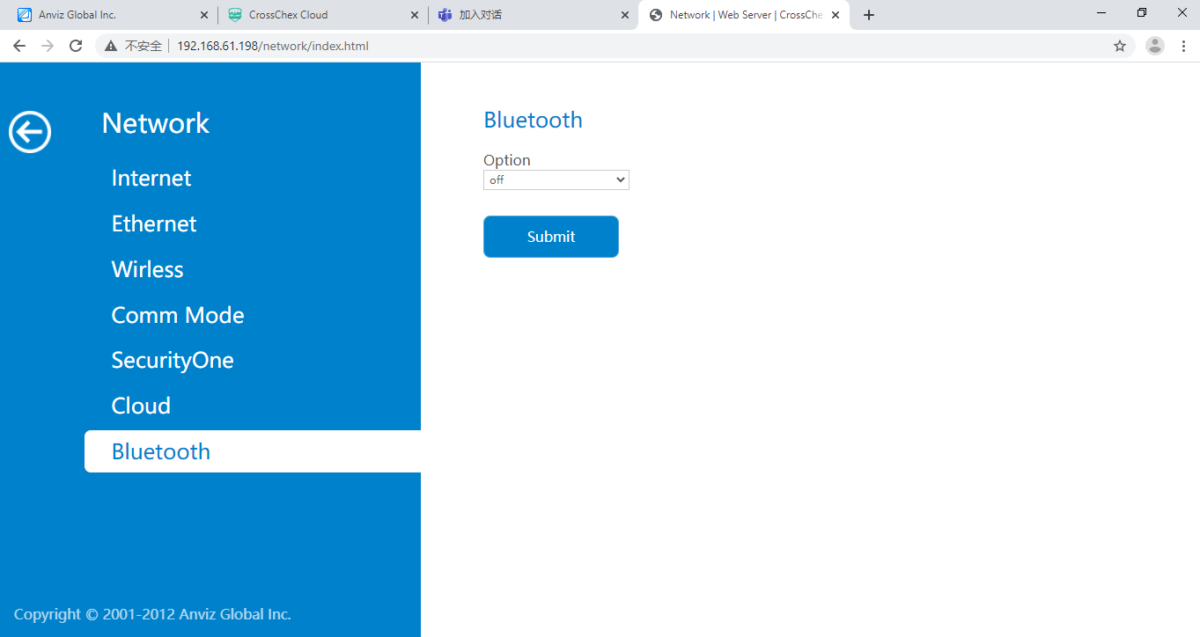
- Todavía dentro del ‘Red‘En ‘Configuración', navegue hasta 'Bluetooth‘ pestaña
- Seleccione la opción ‘fuera‘opción‘ en el apartado ‘Opciones‘ dropdown’
- Hacer clic Enviar
Nota: También puede ser necesario reiniciar el dispositivo si no se producen cambios.
Para obtener más información y orientación general sobre nuestros productos y servicios, por favor Contáctenos.
¿Requiere más ayuda?
Buscar todo Base de conocimiento artículos
Enviar un Solicitud de asistencia Al equipo de soporte de Idency

















 English (UK)
  English
  English (Canada)
  Français du Canada
  Svenska
  Português
  Nederlands
  Italiano
  Français
  Español
  Deutsch