



































Configurar Malwarebytes para roles de servidor de Windows
Este artículo se aplica a Malwarebytes Endpoint Security y Malwarebytes Endpoint Protection.
Malwarebytes soporta todos los sistemas operativos de Windows Server de 2008 a 2016 y sus variantes, todos ellos en los módulos de protección en tiempo real de Malwarebytes: Protección Web, Anti-Exploit, Anti-Malware, Anomaly Detection y Anti-Ransomware.
Algunos módulos de protección no deben estar habilitados para roles de servidor específicos.
Se deben aplicar las siguientes configuraciones recomendadas por Malwarebytes a estas funciones del servidor, ya que se ha encontrado que otras configuraciones causan conflictos o problemas de rendimiento.
Malwarebytes continúa mejorando sus módulos de protección cada día y actualizaremos la guía a continuación a medida que se publiquen y se prueben nuevas versiones.
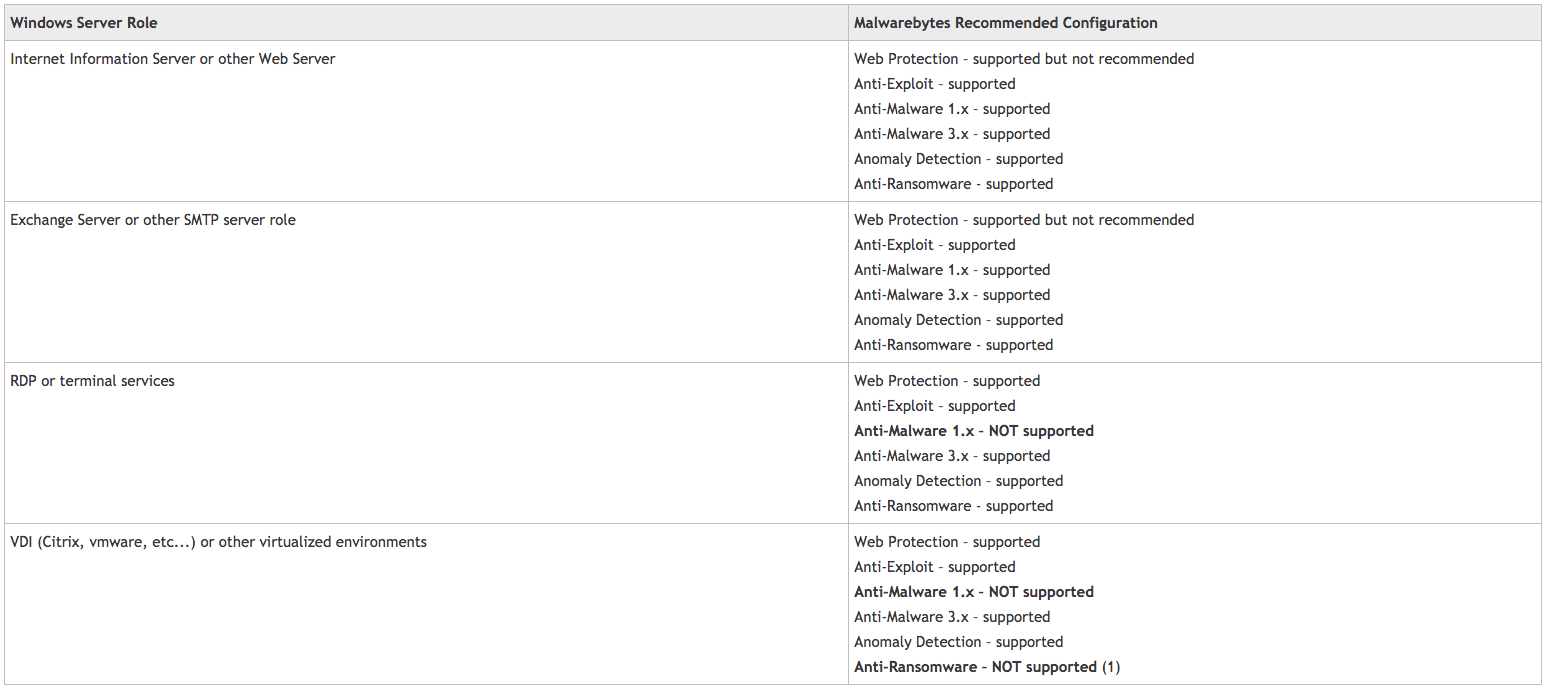
El módulo de protección contra ransomware está actualmente desactivado para todos los servidores de Windows en la consola basada en la nube y volverá a estar disponible con la introducción de la nueva pestaña de sistema operativo Windows Server en el perfil de configuración, donde los clientes podrán ajustar la protección en tiempo real según la función del servidor.
Para obtener más información y orientación general sobre nuestros productos y servicios, por favor Contáctenos.
¿Requiere más ayuda?
Buscar todo Base de conocimiento artículos
Enviar un Solicitud de asistencia Al equipo de soporte de Idency

















 English (UK)
  English
  English (Canada)
  Français du Canada
  Svenska
  Português
  Nederlands
  Italiano
  Français
  Español
  Deutsch