



































Anviz CrossChex: Los registros de temperatura no se muestran en el software
Cómo configurar los ajustes del software para mostrar los registros de temperatura de Anviz CrossChex
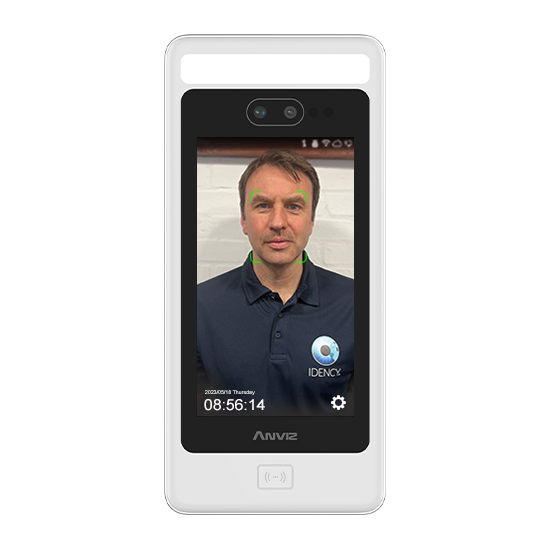
Si está utilizando los nuevos y avanzados productos de detección de temperatura de Anviz (como el FaceDeep 5 IRT & FacePass 7 IRT), es posible que desees informar sobre los registros de temperatura que las terminales recopilan cuando los usuarios fichan en la(s) terminal(es). Para poder ver estos registros de temperatura, hay algunos Software Anviz CrossChex configuraciones que necesitará configurar.
Configurar el software CrossChex
TENGA EN CUENTA: Los terminales de temperatura Anviz ya deben estar conectados al software CrossChex y ser utilizados por los empleados para que estos registros aparezcan.
- En primer lugar, asegúrate de que estás usando el última versión de CrossChex. Esta función solo está disponible para la versión V4.3.14.0 y superior
- Abra el software CrossChex como administrador (haz clic derecho en el icono de escritorio de CrossChex y selecciona ‘Ejecutar como administrador)
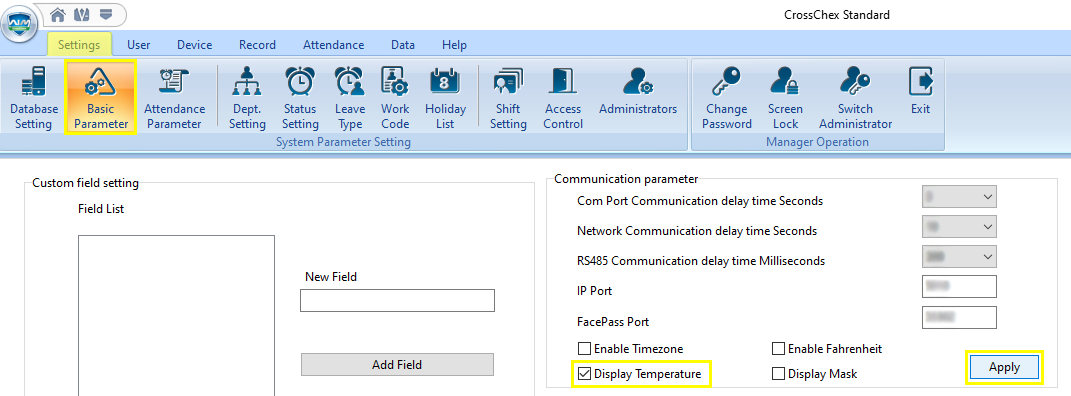
- Dentro de ‘Configuración’ pestaña (resaltada en la imagen), navegar a ‘Parámetro básico’
- Seleccione ‘Mostrar temperatura’ casilla de verificación y clic ‘Aplicar’
- Debajo de ‘Registro’ pestaña, ahora tendrás una nueva columna titulada ‘Temperatura‘que enumera los registros de temperatura que se han registrado para los usuarios
Si también desea saber cómo asegurarse de que los registros de temperatura aparezcan en los registros exportados, consulte: CrossChex: Los registros de temperatura no se muestran en los informes exportados
Para obtener más información y orientación general sobre nuestros productos y servicios, por favor Contáctenos.
Buscar todo Base de conocimiento artículos
Enviar un Solicitud de asistencia Al equipo de soporte de Idency


















 English (UK)
  English
  English (Canada)
  Français du Canada
  Svenska
  Português
  Nederlands
  Italiano
  Français
  Español
  Deutsch