



































Anviz M5: Registering Management Cards
How do you register management cards on the Anviz M5?
For help with user registration for the Anviz M5, please refer to Idency’s ‘Anviz M5 Installation & User Set up Guide‘ video and skip to 10:10 for details of management card registrations. You can watch the video below:
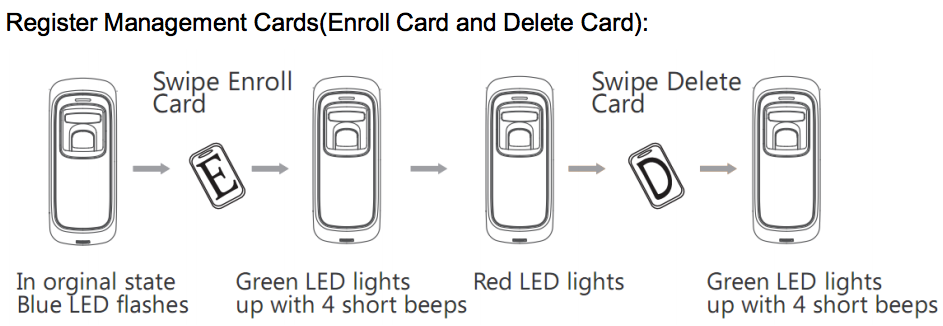
For further help with user registration for the Anviz M5, you can refer to the diagram below which shows the device status using LED indicators when registering a card.
Alternatively, you can find helpful information within the Quick Start Guide and User Manual for the Anviz M5.
For more information and general guidance on our products & services, please contact us.Require further support?
Search all Knowledgebase articles
Send a Support Request to The Idency Support Team

















 English (UK)
  English
  English (Canada)
  Français du Canada
  Svenska
  Português
  Nederlands
  Italiano
  Français
  Español
  Deutsch